{{item.name}}
Prix: {{currency}}{{item.price| numberThousandsCommas | numberDecimalPoint}}
Quantité: {{item.amount}}


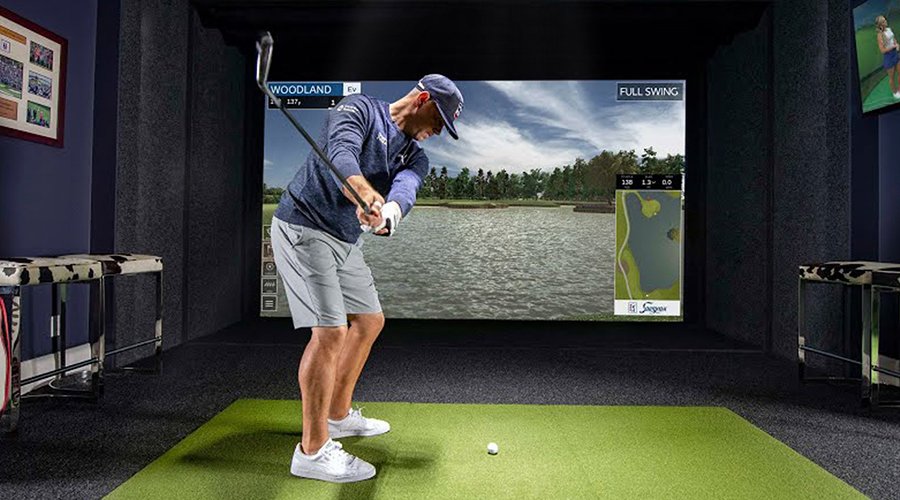
In 2021, Phil Mickelson became the oldest golfer ever to win a major – just a few months after using a GCQuad launch monitor to rack up some amazing stats while fine-tuning his swing virtually. The new Foresight QuadMAX is now one of the most expensive launch monitors you can purchase, tracking your club angles as well as ball spin – which makes it perfect for a high-end golf simulator system. With all this data available – what is the right projector to match with these technological wonders so you can have the best simulator experience in your home? Here is what you want to look for in selecting a premium projector for your simulation room:
A photometric system like the GCQuad requires a lot of light for the launch monitor to see and track the ball. But ambient light is the enemy of a projected image, so you will need a bright projector to light up your impact screen. Most setups with a larger screen require at least 4000 lumen laser projectors, and aa 5000-lumen model enables you to see more detail and have enough power to look great on a 3.7 metre (12 foot) or wider impact screen. It also enables the simulator to double as a giant television when you want to watch a golf tournament.
Foresight’s FSX’s premium courses enable you to play the best courses in the world in ultra-realistic 4K UHD resolution. This technology enables you to see the details of the wall of Hells Bunker at the 14th at St. Andrews for the ultimate in a realistic simulator. Running this amazing software on a generic classroom or conference room projector is nearly the equivalent of fitting off-road tyres to a new Porsche 911 Carrera T..
The BenQ 4K AK700ST is one of the only golf simulator projectors that can render every one of the 8.3 million pixels from your simulator on your impact screen – showing every detail you paid for. With its new Unity engine, the FSX Play platform renders the blowing leaves at St. Andrews Old Course, as well as the grainy sand in the multitude of bunkers at Carnoustie perfectly. Remember, the larger your impact screen – the more important resolution is to enable the image to look realistic.
Good players notice the details in every hole. Great golf simulators render every detail on the course with true and accurate colours. A typical conference room projector can’t render the difference between greens with creeping bluegrass or one with poa anna grass. Why? Many of these projectors are designed for brightness instead of colour accuracy. The result is an image that may be bright enough to fill your impact screen – but without compelling realism. The best projectors for a Foresight QuadMAX or GCQuad use a 10-bit colour processing system that have Rec. 709 colour accuracy, and a special golf colour mode built into the projector created by engineers who work with course designers to get the details right. All BenQ golf simulator projectors in this class have the same DLP colour technology used in commercial digital cinema.
To set up an awesome golf simulator you will want a projector with a short-throw lens. This enables you to mount the projector in a spot out of danger – but also in a way where the player doesn’t cast a shadow on the screen. In the past, a good projector required an expensive optional lens, but the latest golf simulation projectors now have integrated short throw lenses that have a great picture and are less expensive.
Both DIY’ers and professional installers appreciate the optical and digital correction tools such as lens shift, keystone, and other features such as digital shrink. Lens shift enables you to move the image up and down or sideways. In addition, the new BenQ AK700ST/AH700ST has built-in cameras and motorised lenses that use AutoEverything technology to automatically set up the projector to your impact screen in just seconds with a touch of the button on the remote.
To get the right projector for your GCQuad, here are several good short throw laser projector models at a variety of price points and mounting positions that will help you have the most realistic experience on your favourite virtual course.
BenQ
AH700ST
BenQ
AK700ST
BenQ
LU935ST
BenQ
LK954ST
Mounting Location
Ceiling / Cart
Ceiling / Cart
Ceiling
Ceiling
Brightness
4000 Lumen
4000 Lumen
5500 Lumen
5100 Lumen
# of Pixels
2.0 Million
8.3 Million
2.4 Million
8.3 Million
Lamp Type
Laser
Laser
Laser
Laser
Colour Accuracy
95% Rec. 709
95% Rec. 709
92% Rec. 709
92% Rec. 709
Lamp Life
20,000 hours
20,000 hours
20,000 hours
20,000 hours
BenQ has trained staff to help you find the perfect golf simulator projector – within your room size and budget. To help you make the best decision, you can reach out to one of our experts to set up anything from a chat to a complete online demo, to help you find the right projector for your needs.
{{item.productWordingTag}}
{{currency}}{{item.finalPrice| numberThousandsCommas | numberDecimalPoint}} Économisez {{currency}}{{item.saveAmount | numberThousandsCommas | numberDecimalPoint}} Économisez {{item.savePercent | numberThousandsCommas | numberDecimalPoint}}%
new device price{{currency}}{{item.regularPrice| numberThousandsCommas | numberDecimalPoint}}


