{{item.name}}
Price: {{currency}}{{item.price| numberThousandsCommas | numberDecimalPoint}}
Qty: {{item.amount}}


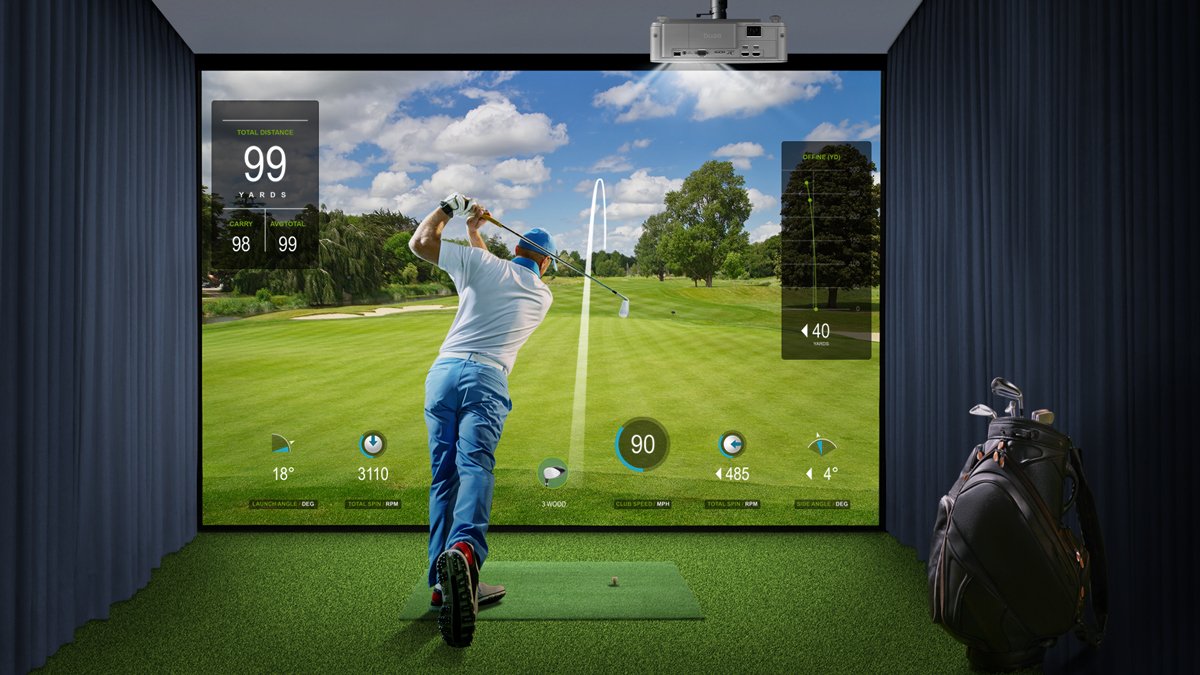
A new trend has bubbled to the surface for golf enthusiasts looking to build a simulator at home: the SimTheatre, a hybrid room that acts as a golf simulator and home theatre. When set up correctly, a SimTheatre gives users an immersive space to practice their golf swing and a place where they can watch their favourite movies or streaming series come to life, all from the comfort of their homes.
Beyond the most immediate appeal of making their designated room a dual-use space, the other major reason for building a SimTheatre is that it can leverage a significant portion of the hardware used for one purpose towards the other, key among them being the projector. This article will guide golf and movie fans on building an effective SimTheatre and what to look for in each component.
To fulfil the demands of the golf simulator side of the SimTheatre formula three main components are required: a launch monitor, a computer, and golf simulator software.
The centerpiece of every golf simulator is the launch monitor. The launch monitor is the sensor used to measure all the data associated with your golf swing, allowing the simulator to determine where and how the ball will travel in the virtual golf course. There are two main types of launch monitors, each characterised by the technology they employ: the Doppler radar monitor and the camera monitor.
A Doppler radar monitor emits electromagnetic waves whose reflections from the swing lead to the data the simulator uses to build the ball's flight. Some of the more well-known Doppler radar monitor brands include Trackman and FlightScope.
Camera monitors rely on multiple high-speed cameras that record the moment of impact when the club hits the ball and then analyse the images to produce the data for the simulation. Brands that produce more widely used camera monitors include Foresight, Uneekor, and Skytrak.
A PC and golf simulation software are required to perform two major operations for the golf simulator: to render the virtual golf course where the simulation plays out and to convert the raw data from your launch monitor into a visual representation of the flight of the ball. While most launch monitors come packaged with sufficient software for a basic simulator, avid golfers looking for the most detailed and accurate visuals might want to consider E6 Golf Connect or TGC2019, both of which can pump out simulations in 4K resolution. Once a software suite is chosen, a PC that matches the system requirements for the respective software will then be needed.
The hardware needed specifically for the home theatre portion of a SimTheatre depends on the user's preferences. For cinema lovers who enjoy buying and collecting physical copies of the films they want to watch, a Blu-Ray player will be something that they might need to purchase. For those not interested in collecting and/or are more into watching streaming series, they'll only need to get a device such as Google Chromecast, Amazon Fire Stick, or Apple TV that can run their favourite streaming services. Additionally, suppose the SimTheatre is going to be used for gaming. In that case, you'll need the gaming console you prefer, which in some instances – for example, with a PlayStation or Xbox – can also double as a Blu-Ray player.
As mentioned earlier in this article, one of the main rationales for building a SimTheatre in your home is the ability to overlap the use of some key pieces of hardware between the two activities, which include the sharing of a projection/impact screen, a sound system, and a projector.
Impact screens are projection screens that can withstand the impact of the hits that result from the golf simulator. These are screens that are qualitatively different from the average protection screen, with an outer layer dedicated to reflecting the light of the projected image coupled with a thick second (and possibly third) layer tightly meshed to reinforce the absorption capabilities of the screen.
Given that a SimTheatre needs to cater to two types of uses, one thing to keep in mind when selecting an impact screen is to choose a screen that can accommodate a 16:9 aspect ratio and whose fabric won't negatively impact the projected image. One other thing to remember with impact screens is that even though they are specifically built to take hits from golf balls, they still wear down over time and require periodic replacements.
To help create an atmosphere that truly immerses the golfer and movie watcher, the SimTheatre should have a surround sound system to enhance the audio of their video content; this consists of two types of audio equipment: an Audio/Video Receiver (AVR) and a 5.1 speaker setup.
An AVR is a device that takes in the signals from the various sources described above and then, in the case of the audio, exports them to the SimTheatre's speaker system. When looking for a suitable AVR, you shouldn't worry about the types of ports available, as most AVRs on the market feature the input/output ports you'll need. Instead, focus on ensuring they support either Dolby or DTS 5.1 to optimise the SimTheatre's sound.
For the speaker system, it's a given that for the type of space used by a SimTheatre, a 5.1 surround sound setup (five speakers and one subwoofer) should be used. The bigger issue for this aspect of the SimTheatre is the placement of each speaker. We suggest doing some extra planning for this, with special attention paid to having the speakers placed out of the range of your golf swing or the path of the ball, even placing them behind the impact screen as an option.
The final item shared by the home theatre and golf simulator is also one of the most vital pieces of hardware discussed in this article: the projector. Outside of having a suitable dual-use space, the ability to begin thinking about creating an effective SimTheatre hinge on having a projector that can simultaneously fulfil the needs of movie-watching on a grand scale and create a compelling golfing experience. To do so, one must find a hybrid projector with specs like the ones described below.
Because the nature of a SimTheatre is to create an engaging visual experience on a big screen for both the golf enthusiast and movie lover, the resolution of the video needs to match the expanded screen size, meaning, at minimum, a projector with 4K resolution is needed. This will ensure the user can see all the fine details on the greens, as most golf simulation software on the market support 4K video output. Furthermore, users should keep in mind that not all 4K projectors are created equal and to look for native resolution 4K PRO UHD (3840x2160). The projector should also support High Dynamic Range (HDR) so that the action – whether cinematic or gaming – happening in all shades within the frame, from the lightest to the darkest, is as clear as possible.
Another facet to producing truly life-like visuals for golf, movie-viewing, and gaming purposes is the ability to represent all the colours on the spectrum authentically. Therefore, a projector with a colour gamut that covers as much as possible of the Rec. 709 industry standard is needed, which means you should look for a projector with at least 92% colour coverage of the Rec. 709. Also, some brands provide extra colour calibration in custom video modes that adjust the colours to match the viewing scenario. In this case, it's suggested that the buyer compare the colours of each prospective projector and make their selection based on their preferences.
As hinted at earlier when discussing speaker systems, placement of the equipment is a concern for SimTheatres, which is particularly true for projectors. While normal golf simulators can usually accommodate side installation, for a SimTheatre built for golf simulation and home theatre purposes, the best bet is to adopt a front ceiling projection setup. This means that one should look for a projector with a short-throw lens since it allows the projector to be mounted closer to the screen than a projector with a normal throw ratio. Furthermore, given a ceiling height of at least three metres, an effective short-throw projector should be installed at least one metre away from the golfer to avoid their swing and any shadows/obstructions on the screen.
It's also suggested that the projector includes lens shift, keystone, and corner fit correction features to easily adjust the projected image for any slight distortions due to the installation location, allowing you to adjust the projected image without diminishing the picture quality.
Because the audio equipment used to build the sound system for the SimTheatre may have an array of connection methods, the projector should have a diverse selection of audio output options. In this regard, one should make sure that the projector has at least HDMI, HDMI (ARC), and S/PDIF output ports available so that there won't be any compatibility problems with the audio equipment used.
BenQ’s 4K golf projector lineup covers different SimTheatre needs, from premium high-brightness installations to versatile multi-purpose entertainment spaces.
If you’re looking for a premium SimTheatre setup with high-end 4K performance, the AK900ST and LK954ST are strong choices. Both deliver 4K UHD resolution and short-throw projection, helping preserve fine course details and cinematic image quality on a large impact screen. The AK900ST takes colour performance further with 97% Rec. 709 coverage, while the LK954ST provides 92% Rec. 709 coverage and dedicated Golf and sRGB picture modes for golf and movie viewing.
- Golf Mode
- sRGB Mode
For installation, both models feature lens shift, giving you greater flexibility to position the projected image while maintaining optical image quality. The AK900ST also adds Auto Screen Fit 2.0 and Auto Focus to simplify setup, including support for flat and curved screens. With 6000 ANSI lumens on the AK900ST and 5100 ANSI lumens on the LK954ST, both are well suited to larger or brighter SimTheatre spaces where strong image performance matters. Both models offer flexible audio connectivity for integration with external sound systems, with the AK900ST supporting HDMI eARC and the LK954ST offering HDMI ARC and S/PDIF.
If you want a well-balanced 4K projector for both golf simulation and everyday entertainment, the AK800ST and AK700ST are practical choices. Both deliver 4K UHD resolution and short-throw projection for immersive golf, movies, sports, and gaming in the same room. The AK800ST provides 5000 ANSI lumens and 97% Rec. 709 coverage, while the AK700ST offers 4000 ANSI lumens with 95% Rec. 709 coverage, giving both models the brightness and colour performance needed for realistic golf courses and rich entertainment visuals.
Ease of use is also a key benefit. The AK800ST features Auto Screen Fit 2.0, Auto Focus, Ambient Light Enhancer, and Golf Scene Memory, making it easier to set up the screen and switch between different entertainment profiles. The AK700ST offers Auto Screen Fit and Quick Focus for straightforward setup, while its low input lag also makes it a strong choice for gaming. Together, these models are well suited to multi-purpose spaces where golf simulation shares the room with movies, sports, and games.
| BenQ AK700ST |
BenQ AK800ST
BenQ LK954ST
BenQ AK900ST
Brightness
4000 lumens
5000 lumens
5100 lumens
6000 lumens
Auto Screen Fit 2.0
No
Yes
No
Yes
Auto Screen Fit
Yes
No
No
No
Optical Lens Shift
No
No
Yes
Yes
Throw Ratio
0.69-0.83 |
0.69-0.83 |
0.81-0.89
0.81-0.89
Rec. 709 Colour Accuracy
95%
97%
92%
97%
Golf Scene Memory
No
Yes
No
Yes
Ambient Light Enhancer
No
Yes
No
Yes
BenQ has trained staff to help you find the perfect golf simulator projector – within your room size and budget. To help you make the best decision, you can reach out to one of our experts to set up anything from a chat to a complete online demo, to help you find the right projector for your needs.

{{item.productWordingTag}}
{{currency}}{{item.finalPrice| numberThousandsCommas | numberDecimalPoint}} Save {{currency}}{{item.saveAmount | numberThousandsCommas | numberDecimalPoint}} Save {{item.savePercent | numberThousandsCommas | numberDecimalPoint}}%
new device price{{currency}}{{item.regularPrice| numberThousandsCommas | numberDecimalPoint}}