{{item.name}}
Pris:
{{currency + item.price}}
Kvantitet:
{{item.amount}}

Det är stor skillnad mellan projektorer som är utvecklade för golfsimulering och sådana som bara säljs för golfsimulering. Vi går igenom skillnaderna med hjälp av modeller från ledande projektortillverkare för att hjälpa dig att avgöra vilken som passar dig bäst.
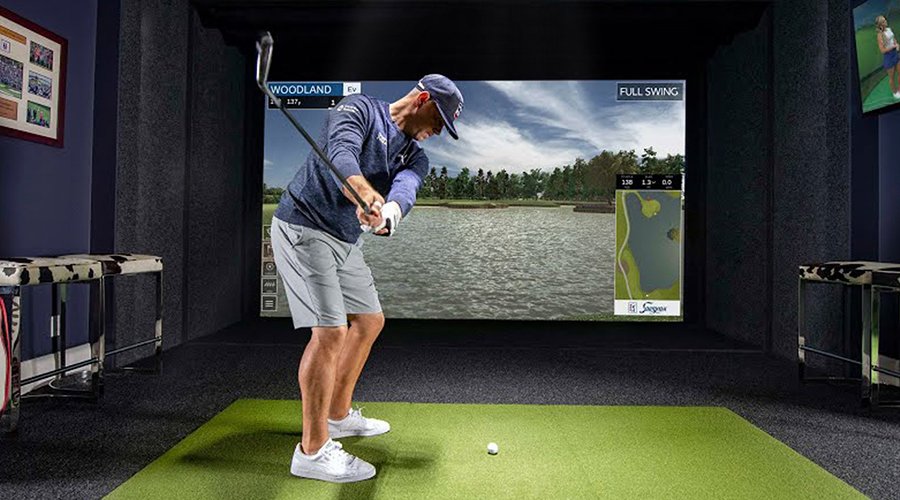
År 2024 kommer golfsimulatorer för inomhusbruk att utmana den traditionella hemmabion som hemmets självklara underhållningsnav. Med bättre och mer prisvärda launch monitors i kombination med nya projektorer för golfsimulatorer är det enklare än någonsin att omvandla outnyttjade ytor till aktiva underhållningsområden för familjen. Det gör det också möjligt för företagare att skapa kommersiella verksamheter för golfträning och underhållning genom att utnyttja lediga butikslokaler. Men vad skiljer en projektor för golfsimulatorer från en vanlig projektor för klassrum eller mötesrum? Vi går igenom skillnaderna mellan olika typer och modeller av projektorer genom att titta på dessa viktiga funktioner:
Golfspelare som svarat på en undersökning från QuestionPro har angett att den viktigaste egenskapen hos en projektor för golfsimulatorer är hur enkel den är att installera och konfigurera korrekt. Varför? Launch monitors i en golfsimulator använder tak- och golvmonterade kameror med särskilda utrymmeskrav för att kunna följa bollen korrekt. Projektorn måste därför kunna monteras på rätt plats utan att störa launch monitorn. Den måste också fylla en slagduk på 200 tum eller större, samtidigt som den hålls undan från flygande golfbollar och stora baksvingsrörelser med en lång driver.
En annan viktig uppgift för en golfsimulator är att undvika skuggor. Till skillnad från en mötesrumsskärm som monteras i eller över ögonhöjd måste bilden från en golfsimulator nå ned till golvet för att skapa en realistisk övergång mellan gräset på skärmen och konstgräset i slagområdet. För populära takmonterade launch monitors som Foresight Falcon och Uneekor XO2 bör slagområdet vara 3 till 3,7 m (10–12 fot) från slagduken.
Låt oss därför titta på två projektorer från ledande varumärken som säljs för golfsimulering och på vilket monterings- och installationsutrymme som krävs för att fylla en populär golfsimulatorbur som är 3 m (10 fot) hög och 4 m (13 fot) bred och ofta används i källare, garage eller mediarum. Med 4 000 lumen ljusstyrka och 1080P-upplösning säljs både BenQ AH700ST och Epson L260F för golfsimulering och ligger på ungefär samma prisnivå. Låt oss titta på skillnaden mellan dem när det gäller monteringsflexibilitet.
Figur 1 – Takmonterade launch monitors från Foresight och Uneekor har särskilda utrymmeskrav i en golfsimulator som projektorerna måste ta hänsyn till.
Monteringsplats för BenQ AH700ST
BenQ AH700ST har en särskild short throw-lins som gör att projektorn kan monteras på avstånd från slagområdet utan att golfspelaren skapar en skugga på skärmen. Linsen är utformad för att stödja stora skärmar, till exempel den 200 tum stora diagonala skärmen i vårt exempel, och hålla hela skärmen skarp och i fokus.
När slagområdet ligger 3 m (10 fot) från slagduken kan projektorn enligt kastförhållandekalkylatorn på ProjectorCentral.com monteras så nära som 3,75 m (12,3 fot) från skärmen och så långt bort som 4,2 m (14 fot).
Nästa steg är att se till att golfspelaren inte skapar några skuggor. BenQ har ett praktiskt verktyg, Golf Sim Room Planner, som kan visa om det finns risk att golfspelaren skapar en skugga. Med verktyget kan du justera efter spelarens längd, så i den här installationen uppstår ingen skugga även om du får besök av en mycket lång spelare.
Figur 2 – Projektorer för golfsimulatorer har särskilda short throw-linser och offset som är utformade för att undvika skuggor på skärmen – även när spelaren är 2,13 m (7 fot) lång.
Monteringsplats för Epson L260F-projektorn
Epson L260F är en klassrumsprojektor som kan visa en bild på 3 meters höjd, men den har ett längre kastförhållande. Det innebär att projektorn måste monteras längre bak i rummet för att fylla skärmen. Med slagområdet 3 m (10 fot) från slagskärmen måste projektorn monteras minst 7,2 m (23,5 fot) från skärmen och så långt bort som 11,6 m (38 fot).
Om vi använder samma exempel med en golfspelare som är 1,8 m (6 fot) lång ser du att det finns risk för skuggor även när projektorn är monterad mindre än 6 m (20 fot) från slagskärmen. Även om det här kastförhållandet fungerar bra i ett vanligt klassrum gör objektivet för traditionella klassrumsprojektorer Epson L260F svårare att montera utan att skapa skuggor i många golfsimulatorer.
Figur 3 – En traditionell klassrums- eller företagsprojektor innebär ökad risk för skuggor från en golfspelare av genomsnittlig längd.
Till skillnad från en vanlig hemmabioprojektorskärm med bildförhållandet 16:9 finns det många populära bildförhållanden för slagskärmar som en golfsimulatorprojektor behöver stöda. Många som installerar en golfsimulator i garaget väljer till exempel 16:10, 4:3 eller till och med en skärm med bildförhållandet 1:1. Det gör att de kan maximera den vertikala slagytan och samtidigt begränsa skyddets bredd till ena sidan av garaget.
Eftersom båda projektorerna har ett ursprungligt widescreen-format på 16:9, hur får du då projektorn att fungera med en slagskärm med ett annat bildförhållande? BenQ AH700ST har avancerad teknik som gör att projektorn, med ett knapptryck på fjärrkontrollen, automatiskt identifierar slagskärmens bildförhållande, inklusive bildförhållandet 1:1, och konfigurerar projektorn så att bilden fyller skärmen från kant till kant. Därefter meddelar den datorn vilken upplösning som behövs, så att grafikkortet kan skicka en oförvrängd bild. Allt på mindre än tio sekunder.
Många andra BenQ-projektorer, som LH600ST, stöder också bildförhållandet 1:1 med bara några knapptryckningar på fjärrkontrollen. För de flesta företags- och klassrumsprojektorer som används för golfsimulering måste du programmera om grafikkortet till en anpassad upplösning för att aktivera en slagskärm med bildförhållandet 1:1.
Figur 4 – Många BenQ-golfsimulatorprojektorer stöder bildförhållandet 1:1 direkt från fjärrkontrollen
Precis som hemmabioprojektorer måste golfsimulatorprojektorer återge komplexa naturliga färger korrekt, som det mörkare gröna gräset på St Andrews och de nyanserade gulbruna tonerna i den ljungkantade ruffen på en linksbana. Det krävs för att skapa en verklighetstrogen och uppslukande bild på en stor slagskärm. Branschstandarden för färgnoggrannhet är färgspecifikationerna enligt Rec. 709, som används i både TV-apparater och hemmabioprojektorer för att säkerställa att färgerna ser rätt ut.
Projektorer för golfsimulatorer kräver både hög ljusstyrka och hög färgnoggrannhet enligt Rec. 709. Vanligtvis har hemmabioprojektorer lägre ljusstyrka och hög färgnoggrannhet enligt Rec. 709, medan ljusstarkare företagsprojektorer ofta inte anger någon färgnoggrannhet och därför kan se orealistiska ut. När en golfsimulatorprojektor kombinerar färgnoggrannhet och hög ljusstyrka får du däremot en uppslukande upplevelse på nästan vilken bana som helst. Här är några exempel på skillnaderna mellan hemmabio-, klassrums- och golfsimulatorprojektorer när man väger ljusstyrka, färgnoggrannhet och pris mot varandra.
Epson Home Cinema 4010
BenQ AH700ST
Epson L260F
BenQ LK954ST
Sony VPL-GTZ270
Projektortyp
Hemmabio
Golfsimulering
Klassrum
Golfsimulering
Hemmabio
Ljusstyrka
2400 lumen
4000 lumen
4000 lumen
5100 lumen
5000 lumen
Färgnoggrannhet enligt Rec. 709
100 %
95 %
Ej specificerat
92 %
100 %
Ursprunglig upplösning
1080p
1080p
1080p
4K UHD
4K UHD
Enligt en nationell undersökning av köpare av golfsimulatorer, genomförd av QuestionPro, vill de ha en underhållsfri projektor som inte kräver byte av lampor eller månatlig rengöring av filter. Hur kan du då avgöra om en projektor verkligen är underhållsfri – eller bara ”i princip” underhållsfri – för din golfsimulator?
Laser- och LED-projektorer
De senaste projektorerna för golfsimulering använder antingen LED- eller laserljuskällor. Båda håller i 20 000 timmar eller mer utan att lampan behöver bytas. Den största skillnaden är att LED-drivna projektorer har bättre färgåtergivning och högre mättnad, medan laserdrivna projektorer kan uppnå högre ljusstyrka.
Förseglade projektorer som eliminerar behovet av filterrengöring
År 2024 använder de bästa golfsimulatorerna en förseglad ljusmotor som håller damm borta från projektorn. Laserprojektorer med denna konstruktion är certifierade som dammtäta enligt IP5X, vilket säkerställer att damm inte kan skada projektorn, även om den är monterad i ett garage.
Vissa projektorvarumärken kräver fortfarande särskilda filter för att hålla damm borta från projektorn, och dessa filter måste rengöras regelbundet. Beroende på hur mycket projektorn används och hur dammigt det är kan filtret behöva rengöras så ofta som varje månad. Rengöringen kan kräva särskild utrustning eller tvätt, och ett ersättningsfilter kostar vanligtvis mellan 35 och 80 euro.
Här är underhållskraven och kostnaderna för projektormodeller som används för golfsimulering.
Eiki EK-308U
BenQ LH600ST
Epson Pro G4700
Projektor
Panasonic
PT-VMZ51
BenQ LU935ST
Ljuskälla
Lampa
LED
Laser
Laser
Laser
Lamplivslängd
3 000 timmar
20 000 timmar
20 000 timmar
20 000 timmar
20 000 timmar
Ersättningslampa
215 €
Ingen
Ingen
Ingen
Ingen
Försluten motor
Nej
Ja
Nej
Nej
Ja
Ersättningsfilter
€37
Ingen
€73
€128
Ingen
Inomhusgolfen växer betydligt snabbare än traditionell golf på utomhusbanor, och kommersiella golfsimuleringsanläggningar dyker upp över hela Europa. De bästa golfsimuleringsprojektorerna är klassificerade för intensiv användning och kan användas i kommersiella golfsimuleringsmiljöer 24 timmar om dygnet, sju dagar i veckan. Många företagsprojektorer är däremot endast utformade för användning i mötesrum, och garantin kan upphöra att gälla vid ”överdriven och kontinuerlig” användning.
Om du funderar på att bygga en kommersiell inomhusgolfanläggning med generösa öppettider bör du därför kontrollera eventuella användningsbegränsningar i garantin innan du väljer projektor. Alla BenQ-projektorer för golfsimulering kan användas så mycket som behövs, och garantin har inga begränsningar av användningen.
Samtidigt som användningen av projektorer inom golfsimulering ökar minskar den totala marknaden för företags- och klassrumsprojektorer. Det har lett till att många projektorföretag har sålts eller helt enkelt försvunnit från marknaden, även välkända varumärken som Hitachi, Dell och Toshiba. Enligt Futuresource är BenQ världens största varumärke inom DLP-projektorer och har fått erkännande för sin överlägsna kundservice.
BenQ har utbildad personal som hjälper dig att hitta den perfekta golfsimulatorprojektorn utifrån rummets storlek och din budget. För att du ska kunna fatta det bästa beslutet kan du kontakta en av våra experter och boka allt från ett samtal till en komplett onlinedemonstration. Vi hjälper dig att hitta rätt projektor för dina behov.

{{item.productWordingTag}}
{{currency}}{{item.finalPrice| numberThousandsCommas | numberDecimalPoint}} Spara {{currency}}{{item.saveAmount | numberThousandsCommas | numberDecimalPoint}} Spara {{item.savePercent | numberThousandsCommas | numberDecimalPoint}}%
new device price{{currency}}{{item.regularPrice| numberThousandsCommas | numberDecimalPoint}}