
Projector
We use cookies and similar technologies on this website to improve our service for you and bring you a more personalized user experience.
By accepting optional cookies, you can enjoy:
Personalized support and live chat (Functional cookies)
Relevant content via anonymized analytics (Analytics / Performance cookies)
Ads and marketing tailored to your interests (Advertising / Targeting cookies)
By clicking “Accept all”, you consent to the use of cookies, including optional cookies. Click “Reject all” to reject optional cookies or click “Cookie Setting” to manage your preferences. Please note that rejecting optional cookies may affect certain website features and functionality. Find out more in our Cookie Policy and Privacy Policy.
Always active
These cookies are required for the operation of the website and cannot be configured.
These cookies allow us to offer you customized content according to your profile, your interests and your usage. By accepting these cookies, you help us to improve the layout and features of our site.
These cookies allow us to understand how you access the site and your browsing habits (e.g. pages viewed, time spent on a page, content clicked). They allow us to analyze the performance and design of our site and to detect possible errors. Owing to these performance indicators, we are constantly improving our site and our products, content and offers.
These cookies are used for BenQ advertisements displayed on third-party websites, including social media, and are tailored to your preferences and to help us measure the effectiveness of our advertising campaigns. They remember that you have visited our site and share this information with partners, such as advertisers, for the purpose of targeted advertising. If you refuse these cookies, advertising (including ours) will continue to be displayed as you browse the Internet, although they will not be specific to your personal interests, and will therefore be less relevant.
Projector
Monitor
Lighting
Remote Work & Learning
By Series
becreatus-dockInteractive Display & Signage
Important Product Recall Notice - GV31
Learn MoreImportant Product Recall Notice - GV31
Learn More
Yes, the HDR and B.I+ functions can be used on this monitor simultaneously. We encourage you to turn both of them on to deliver a greater visual performance in any viewing environment. Please refer to the below side-by-side pictures to see how much improvement the B.I.+ can deliver to the HDR performance.
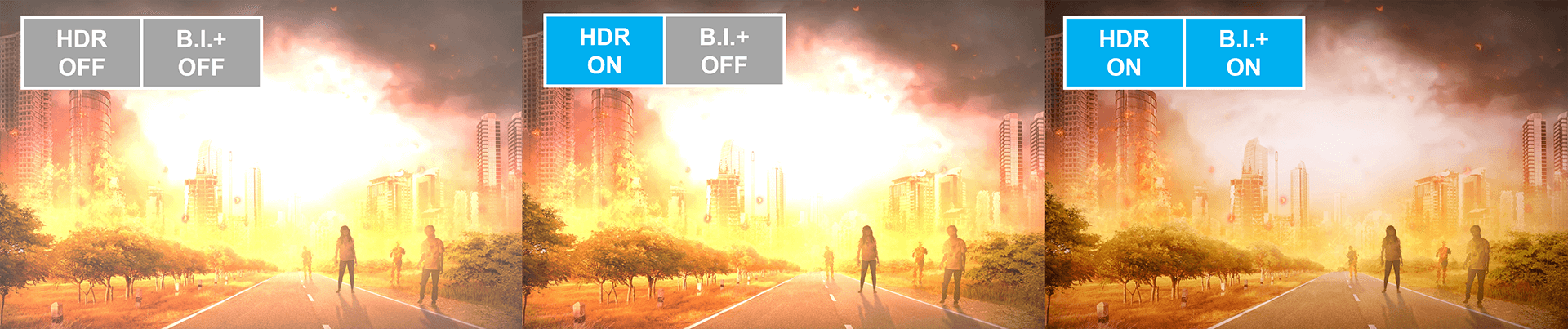
▲Lower dynamic contrast causes the picture quality to look very ‘flat’.
Details in the dark areas may be lost and bright areas may suffer from overexposure.
▲“HDR ON” will help to increase the dynamic contrast but you may get overexposure in the bright areas if the screen’s brightness isn’t adjusted accordingly.
▲Turn both “HDR” & “B.I.+” on to get optimized HDR performance with clearer levels of details in the dark areas of the screen while avoiding overexposure in the bright areas.
The reason B.I.+ can perfect HDR performance is because the B.I.+ Sensor can detect the level of ambient lighting as well as the content being viewed to automatically adjust screen brightness, dynamic contrast and colour temperature.
The result of this? Optimized HDR performance with clearer levels of details in the dark areas of the screen while avoiding overexposure in the bright areas. This contributes to protecting your vision, with BenQ’s coveted Eye-Care features also making sure that your eye-health is retained during long sessions in the desk, whether it’s for work or pleasure.
Applicable Models
EW277HDR
Thanks for letting us know. How would you describe this FAQ?
Thanks for your feedback!