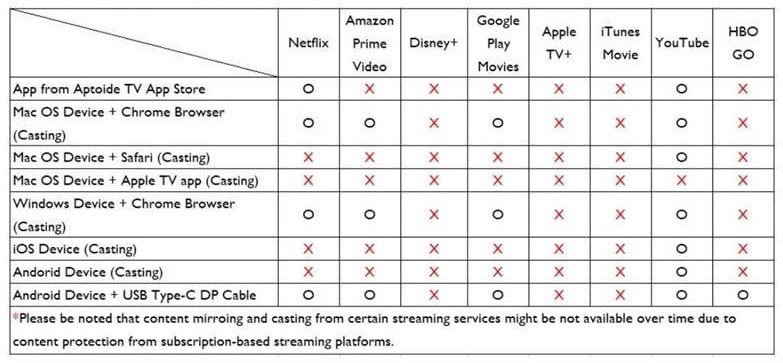
Paid streaming apps like Netflix, Prime Video, Max, Hulu, and Disney Plus have copy protection that prevents mirroring from mobile devices due their strict policies. But, Netflix’s content can be cast wirelessly via your laptop’s Google Chrome Browser. Watch this video for how to cast Netflix via your laptop’s Google Chrome Browser.
Alternatively, you can plug a media device like an Apple TV or Chromecast to your projector via HDMI and use the apps installed on the media device. The same goes for gaming consoles such as the Xbox and PlayStation. Plug them via HDMI to the projector and then run the Netflix app installed on the console.
If you prefer simple setups with no additional devices beyond your projector, you can use the Aptoide TV platform that comes installed on selected projectors. Aptoide is an app store much like those found on Android or iOS, with several streaming apps available. The Aptoide TV store has versions of Netflix, Max, Amazon Prime Video, and YouTube. However, as mentioned above, due to app developer and owner content policies some restrictions may still apply when mirroring.










![How Can I Connect a Mac® M1/M2/M3 to BenQ Monitors? [Updated]](https://image.benq.com/is/image/benqco/thumbnail-m1-solution?$ResponsivePreset$)

