{{item.name}}
Price: {{currency}}{{item.price| numberThousandsCommas | numberDecimalPoint}}
Qty: {{item.amount}}


Projectors

Monitors
Lighting
Interactive Displays & Signage
Remote Work & Learning
Shop
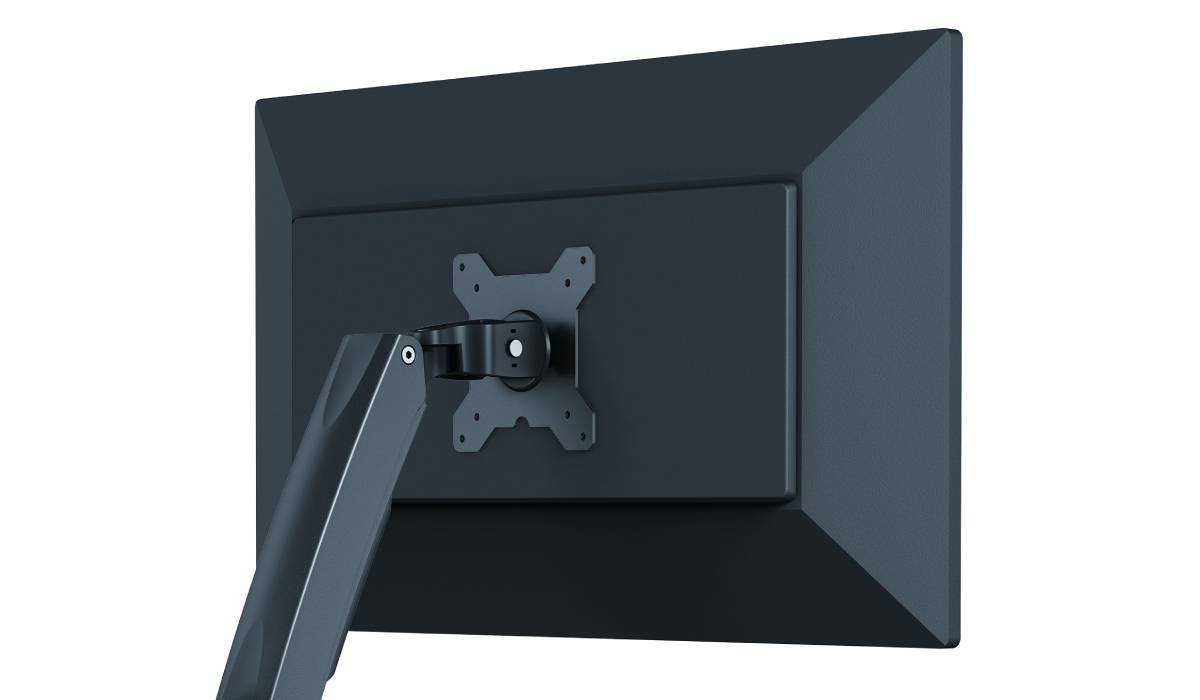
Mounting your monitor or TV on an arm or other attachment provides great flexibility and improves ergonomics.
For monitors and TVs with a VESA mount, you’re not restricted by a fixed stand and can choose an accesory to find the best viewing position and angle for you. Wall mounts are essential for hanging up a big screen TV, while arms and desk mounts are more common for monitors. All of these have been addressed by VESA mounts, designed by the Video Electronics Standards Association. Most of the monitors and TVs made today have VESA mounting screw holes built into their designs. However, this isn’t guaranteed, so as always check the specs.
Also, and acronyms aside, what you need to keep in mind if you want to mount your monitor or TV on an arm or other attach point are weight and screw hole pattern. The weight’s obviously vital to know as you don’t want your display breaking the mounting interface and falling down in spectacular fashion. So look that up in the manufacturer’s specs. The mounting screw hole pattern on the back of your monitor or TV is where you’ll connect the mounting interface and then the arm. There are different patterns for various display sizes, so make sure to measure the distance between the screw holes and note their pattern.
VESA and display manufacturers use a variety of mounting interface standards and thus there are a similarly wide range of attachments. Not all monitors use the same pattern and not all arms are the same. While standardized, VESA mounting is NOT universal, rather sub-categorized. So please do your due diligence.
For popular office and work monitors in the 22”-24” range, the most common pattern is MIS-D. Spacing between screw holes is 100mm or 75mm, or a combination of the two. You may have 100 x 100, 100 x 75, or 75 x 75 patterns. This MIS uses regular M4 screws that are 10mm wide. By the way, MIS stands for Mounting Interface Standard.
Larger monitors, like 27” gaming displays, require the MIS-E pattern. Again, M4 10mm screws are used, but the spacing between screw holes grows to 400mm, 200mm, and 100mm. Usually that entails a 200 x 100 pattern, but 200 x 200 or 100 x 100 may also occur.
Then we have MIS-F for the biggest monitors and essentially every TV made nowadays. If you have a nice 32” 4K UHD monitor then this is the VESA mounting pattern you need to look at. Bigger M6 and M8 screws are used to sustain larger payloads, and the pattern is likewise expanded. Manufacturers will typically only use 200mm or even 400mm spaces between screw holes to spread out the mount pressure for better handling of larger display weight.
We can’t stress enough that unlike resolution, brightness, HDR, or refresh rate, VESA mounting requires more alertness on your part. By nature and design it’s more of a DIY affair, unless you hire someone to do all the work for you. Otherwise, you will need to break out the measuring tape and look closely at your display’s official specifications.
The classic application for VESA mounts are desk or wall swivel arms that allow you to flexibly reposition your display “in the air”, so to speak. There are also ceiling and floor mounts, but those are primarily reserved for projectors as it would make very little sense to do that with a flat screen. VESA mount adapter kits exist to help you switch between MIS grades. For example, a 24” monitor may be mounted using an adapter that “upgrades” it to a VESA pattern designed for a 27” display. We don’t recommend doing it the other way around, because no matter how good the adapter or mount kit, a 27” monitor will always be too heavy for something designed to hold a 24” screen.
With VESA mounting you enter a new realm of ergonomics and convenience. But due to the very physical nature of mounting a hefty display, we once more remind you to exercise caution and smart buying. Know your monitor’s weight and measure its mounting pattern for yourself, just to be sure. Again, unlike the “soft” specs of a monitor, here we’re talking about something that involves safety on a more primary level, so please act responsibly.
Recommended Products
{{item.productWordingTag}}
{{currency}}{{item.finalPrice| numberThousandsCommas | numberDecimalPoint}} Save {{currency}}{{item.saveAmount | numberThousandsCommas | numberDecimalPoint}} Save {{item.savePercent | numberThousandsCommas | numberDecimalPoint}}%
new device price{{currency}}{{item.regularPrice| numberThousandsCommas | numberDecimalPoint}}