{{item.name}}
Price: {{currency}}{{item.price| numberThousandsCommas | numberDecimalPoint}}
Qty: {{item.amount}}

Remote Work & Learning


Projectors

Monitors
Lighting
Interactive Displays & Signage
Remote Work & Learning
Shop
Stellar color performance can take your monitor viewing experience from mundane to magical. Today’s pro-grade desktop monitors boast specs that can blow your mind and leave your head spinning. One spec that causes a lot of confusion is color bit depth, which determines the total number of colors your monitor can display. We’ll discuss the different ways monitors add color to your work and your world.
10-bit color depth
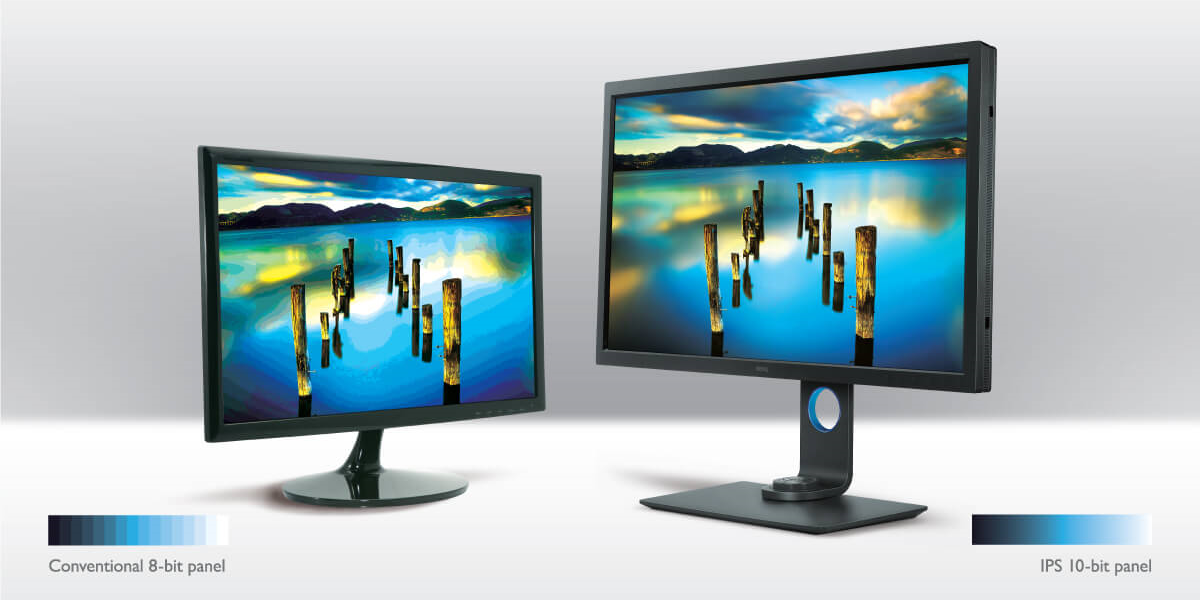
1.07 billion hues is what you get from 10-bit color, and this can be achieved in two ways. The right way for you depends on how you use your display. True 10-bit displays have 10 bits per pixel, for 1024 shades of RGB color (Red, Green, Blue). Cube that and you get to those 1.07 billion shades. You can expect smooth gradations and improved realism in photography and video content, but it can be expensive and sometimes more than you need.
When you move down to 8-bit, you still access an impressive 16.77 million colors from 256 RGB tones produced from this tech. But you’ll notice a difference if you compare 8-bit to 10-bit. Colors can still appear vivid and brilliant, but shading will be less fluid, and gradations can appear less subtle. In an ideal world, you’d be able to access 10-bit color at an 8-bit cost. That’s where Frame Rate Control comes in.graphy and video content. Amazing. Beautiful. Also expensive and sometimes more than you need.
There is a way to experience all the colors of 10-bit with an 8-bit monitor. Frame Rate Control manipulates pixels so they flash two alternating colors so quickly that you perceive any of the shades in a billion-color experience. And, if you work in the creative space, you have been or already are working on an 8-bit or 8-bit + FRC monitor, as this is the most common setup today.
While 8-bit + FRC is a stellar solution for most, some situations call for true 10-bit.
If you're working in a high-end Hollywood retouching studio or in retouching where individual pixels are zoomed to more than 500%, you'll probably require 10-bit. But for most of the rest of us, the 8-bit + FRC monitor is adequate, accessible, and affordable.
As for quality of display, 8-bit + FRC monitors have won the prestigious TIPA Award for Best Professional Photo Monitor for the past two years. This global award from the Technical Image Press Association recognizes the world's best in photo/video innovation. Each of those winning displays was manufactured by BenQ. Only you can decide the best monitor for your needs.
A monitor viewing experience goes beyond the monitor itself, it involves glare prevention and eye protection provided by lighting bars, such as the ScreenBar Pro. It also takes the bit debate into consideration. For those who care about colors, the ScreenBar Pro features a full-spectrum LED chip with a CRI > 96 and an Rg close to 100. Additionally, its asymmetrical optical design allows you to work in comfortable lighting environments without affecting your monitor's color calibration. Regardless of if you’re working on an 8-bit or 10-bit monitor, the ScreenBar Pro offers the best lighting solution for your setup.
Recommended Products
{{item.productWordingTag}}
{{currency}}{{item.finalPrice| numberThousandsCommas | numberDecimalPoint}} Save {{currency}}{{item.saveAmount | numberThousandsCommas | numberDecimalPoint}} Save {{item.savePercent | numberThousandsCommas | numberDecimalPoint}}%
new device price{{currency}}{{item.regularPrice| numberThousandsCommas | numberDecimalPoint}}