Projectors
Monitors
Lighting
Interactive Displays & Signage
Remote Work & Learning
Wireless PresentationShop
Welcome to BenQ Europe
How can I change my BenQ cookie settings?
Some essential features on BenQ sites just won’t work without cookies. And having other cookies switched off can seriously affect the way you’ll be able to enjoy our services.
Please check your cookie settings below and turn on any cookies you’re happy with.
“Strictly necessary” cookies can’t be turned off. But Functional and Performance cookies can be turned on or off below. You can learn more about cookies and what they do on our other pages.
If you've chosen to block third-party cookies on your browser, your cookie preferences won't carry over from benq.eu to benq.xx and vice versa. Please make sure to set your cookie preferences in both places.
On
Strictly necessary cookies
These cookies are essential so that you can move around the website and use its features. Without these cookies services you have asked for cannot be provided.
On
Off
Functional cookies
These cookies allow the website to remember choices you make to give you better functionality and personal features.
On
Off
Performance cookies
These cookies help to improve the performance of BenQ. If you want to opt-out of advertising cookies, you have to turn-off performance cookies.
Need help choosing your next BenQ product? Our online Live Chat connects you with real experts. No bots - just genuine human assistance.
Chat with us today!Need help choosing your next BenQ product? Our online Live Chat connects you with real experts. No bots - just genuine human assistance.
Chat with us today!
With NVIDIA DLSS on GeForce RTX 30 series cards, your 4K monitor meets all-new frame rate highs while those on 1080p monitors get blisteringly-fast refresh plus better than ever visual fidelity
One of the most exciting developments for PC gamers in recent years is deep learning super sampling, or DLSS. Developed by NVIDIA and increasingly prominent since the release of the GeForce RTX 20 series, DLSS has entered its latest iteration with the arrival of GeForce RTX 30 series models like the RTX 3090, RTX 3080, and RTX 3070.
Why is DLSS so important? Because it very effectively provides an all-in-one replacement for computationally costly processes such as anti-aliasing and up/down scaling, and theoretically renders resolution almost irrelevant, pun most definitely intended. DLSS works on the hardware level through so-called Tensor cores on NVIDIA graphics cards, employing AI or deep machine learning to optimize the performance of any DLSS-enabled game.
If you’re a PC gamer, DLSS boosts the value of your graphics card and essentially increases graphics processing power through virtualization. In extreme cases, DLSS basically works like SLI, except instead of adding a second card at great financial cost you get double the performance thanks to virtualized AI power without any extra hardware.
Unlike traditional anti-aliasing and scaling or sampling, DLSS has almost no computational cost as all the calculations are done on the primary hardware level and in the background. That’s why DLSS is so good at increasing frame rates in compatible games.
Only turn on DLSS in games that support it. There’s no need to activate it in the NVIDIA Control Center, unlike v-sync and G-Sync. DLSS, much like the very closely associated ray tracing, is always active on graphics cards that have the feature built into them.
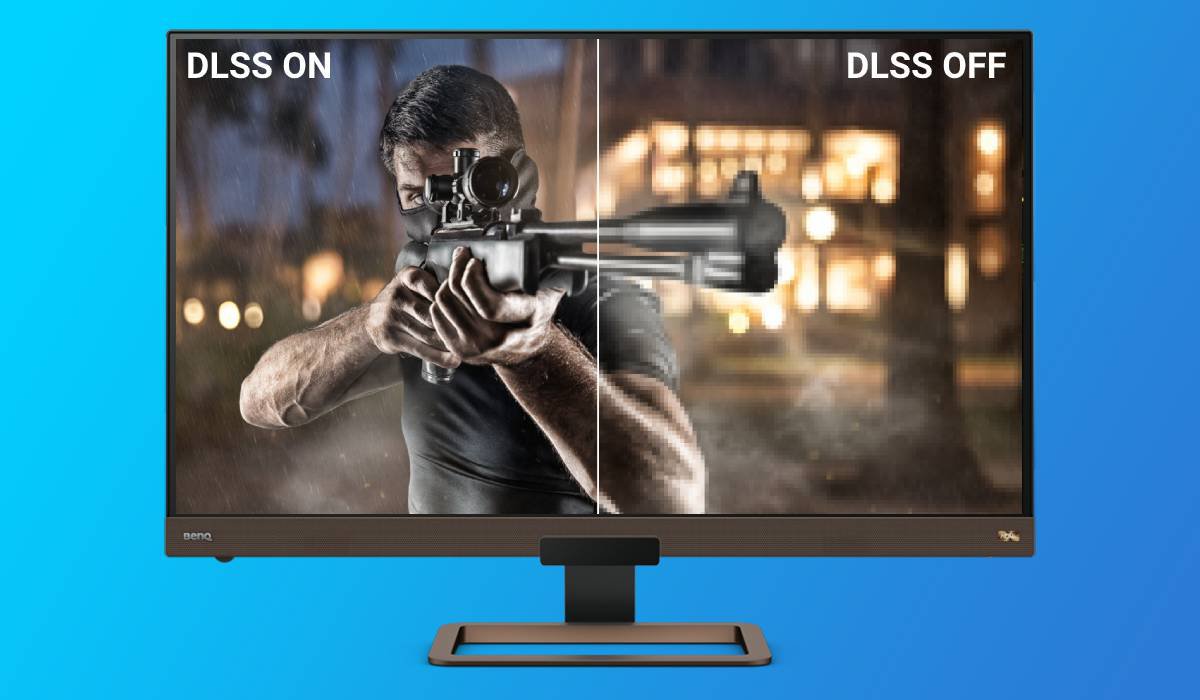
In the image below we look at Control from Remedy, which runs on the rather demanding Northlight engine. Control supports DLSS and it’s imperative you turn it on, as shown. For instance, you have a very nice 4K monitor with an RTX 3070. Sure, you can run Control in 4K rendering and 4K output with ray tracing on and everything set to max. But your frame rate will likely be under 30 per second. With DLSS, you may have the internal rendering set to 1440p with output at 4K. DLSS automatically does the super sampling or upscaling and takes care of the anti-aliasing. The results are indistinguishable from native 4K, but the frame rate we measured was around 50, which is much better than 30.
Plus, there’s no need for anti-aliasing with DLSS, and none of the fuzziness or artifacts associated with upscaling or super sampling appeared.
All this by simply turning DLSS on!
For the sake of testing, we reduced the internal render resolution to 1280 x 720, but kept output at 3840 x 2160 with DLSS on. Visually, Control still looked very close to native 4K in appearance, and unsurprisingly ran at up to 80 frames per second. For a title as demanding as Control (a fitting name indeed), that’s a big miracle. Effectively, with DLSS the AI makes the gap between internal rendering resolution and output resolution basically irrelevant. Our machine learning friends are getting so good at this, we suspect games could soon run at 640 x 480 and output 8K without any of us humans even noticing.
DLSS also works for downscaling. Say you have a high speed 1080p gaming monitor. You can run games at 4K and DLSS technology will auto adjust the 3840 x 2160 render to a 1920 x 1080 output. In this case of course it won’t look like 4K, your monitor doesn’t have enough pixels. But it will look like very good full HD. You won’t need anti-aliasing, which historically has been the weakness of 1920 x 1080 compared to 4K and even QHD. You will also get much cleaner and more accurate textures. And the frame rate will be phenomenal, easily maxing a 144Hz gaming panel. The same applies to 1440p to 1080p or 2160p to 1440p. DLSS and similar technologies, like Microsoft DirectML, work with all resolutions to our knowledge.
Other than needing to buy a new graphics card that has DLSS, the only downside is inherent to the “learning” part of DLSS. Conceivably, and this is based on our own subjective observations, DLSS may cause longer loading times in some cases on initial launch of a game. That’s because the Tensor core AI literally needs to study the game you just launched for the first time and optimize shader performance accordingly. It’s like bringing a new car to your favorite mechanic. Of course it’ll take a little longer than with the car you’ve brought over during the last five years.
Obscure car analogies aside, graphics cards with DLSS seem to create profiles on the fly for each game. We don’t know if these are saved anywhere, but we noticed games that we’ve been playing for years with the GTX 1080 Ti from SSD took longer to launch from the same drive with an RTX 3070 on the first go. But not the second and beyond. This leads us to think that major hardware changes may also cause DLSS AI to re-learn your setup relative to each game.
But a short optimization process once in a while is a small price to pay for insanely better frame rates and possibly making resolution a non-issue. We’re just beginning this mature stage of AI in game graphics, and no doubt the future has many surprises in store, though hopefully not of the type that’ll decide what games you’ll play for you. That won’t be as nice.
Recommended Products
{{item.productWordingTag}}
{{currency}}{{item.finalPrice| numberThousandsCommas | numberDecimalPoint}} Save {{currency}}{{item.saveAmount | numberThousandsCommas | numberDecimalPoint}} Save {{item.savePercent | numberThousandsCommas | numberDecimalPoint}}%
new device price{{currency}}{{item.regularPrice| numberThousandsCommas | numberDecimalPoint}}