Projectors
Accessories
Accessories
Projectors
Monitors
Lighting
Accessories
Interactive Displays & Signage
Shop
Welcome to BenQ Europe
How can I change my BenQ cookie settings?
Some essential features on BenQ sites just won’t work without cookies. And having other cookies switched off can seriously affect the way you’ll be able to enjoy our services.
Please check your cookie settings below and turn on any cookies you’re happy with.
“Strictly necessary” cookies can’t be turned off. But Functional and Performance cookies can be turned on or off below. You can learn more about cookies and what they do on our other pages.
If you've chosen to block third-party cookies on your browser, your cookie preferences won't carry over from benq.eu to benq.xx and vice versa. Please make sure to set your cookie preferences in both places.
On
Strictly necessary cookies
These cookies are essential so that you can move around the website and use its features. Without these cookies services you have asked for cannot be provided.
On
Off
Functional cookies
These cookies allow the website to remember choices you make to give you better functionality and personal features.
On
Off
Performance cookies
These cookies help to improve the performance of BenQ. If you want to opt-out of advertising cookies, you have to turn-off performance cookies.
Win a MOBIUZ OLED Monitor
Enter NowWin a MOBIUZ OLED Monitor
Enter Now
Important Product Recall Notice - GV31
Read moreImportant Product Recall Notice - GV31
Read more
Need advice? Our online chat connects you with real experts instead of bots
Chat with us todayNeed advice? Our online chat connects you with real experts instead of bots
Chat with us today
Yes, especially in conjunction with other essential factors such as bit color depth, peak brightness, and contrast ratios. Chroma sampling determines monitor fidelity and impact, although the perception of color obviously varies from person to person. The bigger the color sample (or the more data a monitor dedicates to presenting color), the more accurate the image.
But let’s get back to basics. And by that we mean the dawn of time, long before monitors, HDR, or 10-bit. Since the beginning of human creativity, artists noticed that audiences pay a lot more attention to light than to color. Given the right lighting, viewers appreciate a painting almost irrespective of the colors used by artists. However, monitors and TVs can’t really compare with paintings since we don’t observe the source image directly. The display accepts a signal and translates data to go up on a screen, which we then view. That’s why in digital displays like the monitors we all use, chroma sampling plays a major role.
And while untold millennia have passed since the first cave drawings, the basic principle of light over color remains true. It’s just how our vision works. We need light to see anything, and color, well, color is great but secondary (that’s why the first movies and early TV were in black and white). In the modern age, the need to represent color on electronic displays became an issue early on. Since the 1920s, engineers at companies like RCA and Philips have worked to develop a way to convey light and color together as one visual feed. That has given rise to the “4x2” matrix used in chroma sampling, and we’ll quickly explain that right now.
To save you time if you’re in a rush, the difference between 4:4:4, 4:2:2, and 4:2:0 mostly becomes apparent in text applications. So if you’re using a monitor you want to be on 4:2:2 at least. Of course, 4:4:4 is always better even if it’s not feasible in every application. Also, chroma sampling has little do to with color bit depth, as in 8-bit or 10-bit. They’re related but only tangentially so.
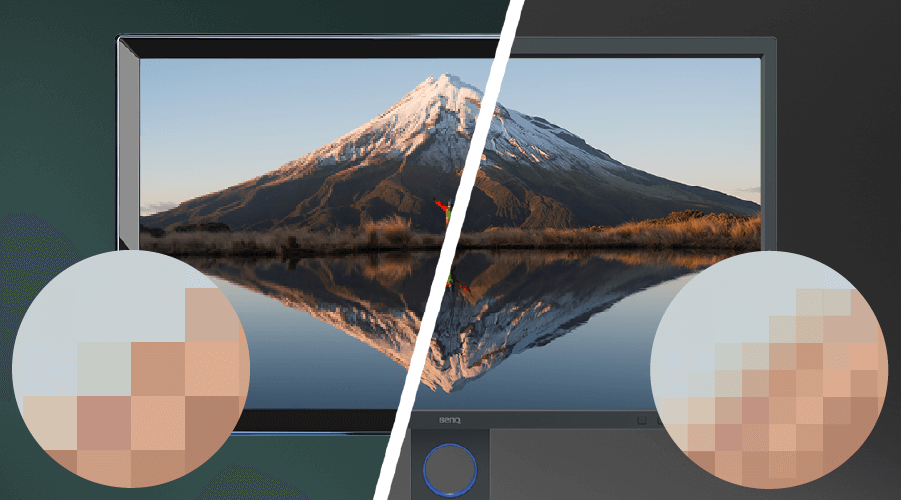
Adopted by every organization and manufacturer related to display, chroma sampling means interpreting color, or chroma, as the second component of an image after luma, or light. The term subsampling denotes a need to compress or reduce from the source, or the original sample. A subsample takes the source and compresses it by reducing color data so the image can fit via connection standards like HDMI, 802.11ac Wi-Fi, internet protocols, and so on. That’s because in many cases the original would simply be too big to transmit quickly enough. Your 4K Netflix streams are highly compressed to ensure they have 8.3 million pixels and 60 frames per second. Reducing color data makes that possible without damaging image quality too much, because the vast majority of people don’t notice color compression.
There’s no luma subsampling even though that is technically possible. Reducing luma or light data would simply make the overall image less visible and totally ruin the experience, so there’s obviously no way that would make sense. Color has to be the victim in this balance sheet.
The standard sample assumes two horizontal rows of four pixels stacked on top of each other. But we have three numbers, as in 4:X:X. The first 4 is constant as it stands for light, and light is always fully sampled without compression. So the row for light is assumed and not shown in the matrix, or grid. The two that are shown represent color sampling, so the second and third numbers stand for chroma (ostensibly blue and red, with green resulting from their mix). If we use 4:4:4 that technically means “true” or uncompressed sampling, and not subsampling. Light gets a full four pixels, and the two color rows also each has four individual pixels sampled. That’s the closest we get to uncompressed video signals right now.
Switch to 4:2:2 and that means each color row only has two pixels sampled. The other four are duplicated from the sample by processing components. In 4:2:0, only two pixels in the top row have color samples, with the remaining six merely copying them and the bottom row having no pixels of its own, thus zero. Sampling less pixels leads to less data having to be delivered between devices, and hence a faster and more efficient connection.
The naming scheme also appears as YUV, YCbCr, or YPbPr. YUV equals 4:2:0 in practical terms, and most game consoles and PC graphics cards support it due to modest bandwidth requirements.
To give you some perspective, a 4:2:0 feed requires half the data or bandwidth of 4:4:4. So that Netflix or Prime Video 4K HDR show you’re watching right now needs about 15-16Mbps in real internet bandwidth. The same content in 4:4:4 would need over 30Mbps in bandwidth, and that’s a big deal for streaming services and internet providers. Using 4:2:0 allows Netflix and others to state a 25Mbps connection is enough to subscribe. Switching to 4:4:4 would mean a 50Mbps minimum to be safe.
As mentioned above, in anything that requires a lot of fine text the difference does emerge. That’s why PCs by default use full RGB, which employs 4:4:4 as its nominal sampling technique. Even 4:2:2 begins to make small letters appear smudged, and 4:2:0 has a rather apparent ghosting or rainbow effect around text. This is important if you choose a TV as your PC monitor – make sure the set and your PC operating system or graphics card driver all support 4:4:4. Rest assured all BenQ monitors offer 4:4:4 sampling support.
It does. But as sampling puts some strain on processing power, the main consideration for manufacturers and content providers is bandwidth for connectivity. So pretty much any display you get your hands on will work with all major sampling and subsampling methods. It’s the core hardware and design of the display that matter too. In this case, color bit depth and peak brightness as well as individual monitor/display color calibration are factors to consider first and foremost.
We’re happy to say BenQ has you covered on all counts.
Get One Free Year Pantone Connect
$90 value
{{item.productWordingTag}}
{{currency}}{{item.finalPrice| numberThousandsCommas | numberDecimalPoint}} Save {{currency}}{{item.saveAmount | numberThousandsCommas | numberDecimalPoint}} Save {{item.savePercent | numberThousandsCommas | numberDecimalPoint}}%
new device price{{currency}}{{item.regularPrice| numberThousandsCommas | numberDecimalPoint}}